Three apps · One account

Three instruments for
the camera department.

Every other tool in this category tries to be one app that does everything. CamPlot Studio is three focused instruments that share one account — plot the day, see the shot, run the numbers — built by a working multicam director and used on network television.

No install neededOpen CamPlot Creator in your browser See the three apps ↓
Free trial · The crew views free, forever
Used on productions for major networks
Hulu
Amazon
Netflix
Paramount
ESPN
CBS
ABC
Fox
The studio

Three tools, each one good at its own job

One account signs you into all three, and what you own in one you own in the others. Here is the short version of each — every app has its own page with the whole story.

CamPlot Creator app icon
CamPlot
Creator
Every shoot, plotted
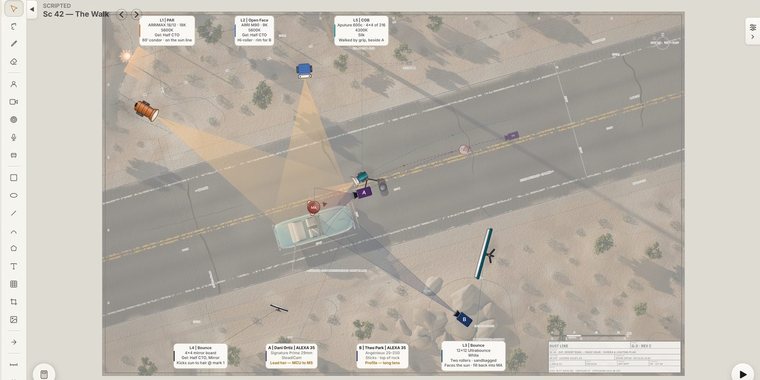
Scripted: a feature-film plot on the Mac — a desert road from above with the picture car, the actor’s walk, two cameras and the lighting package

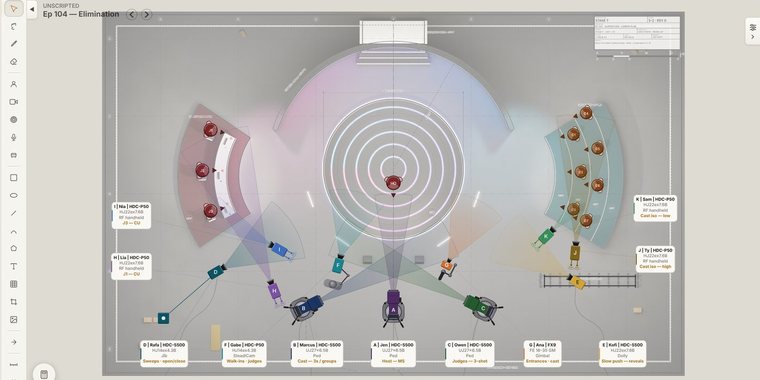
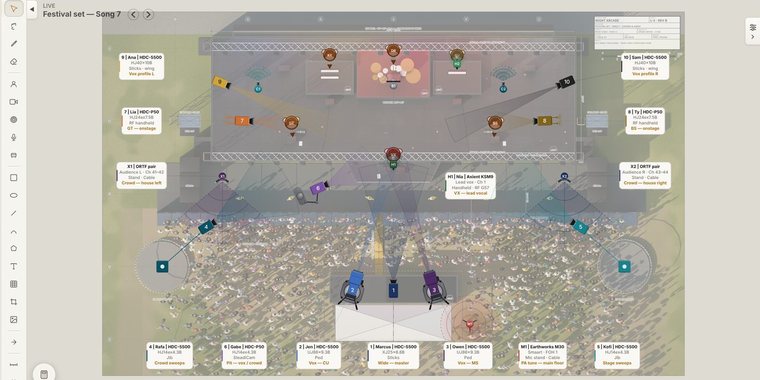
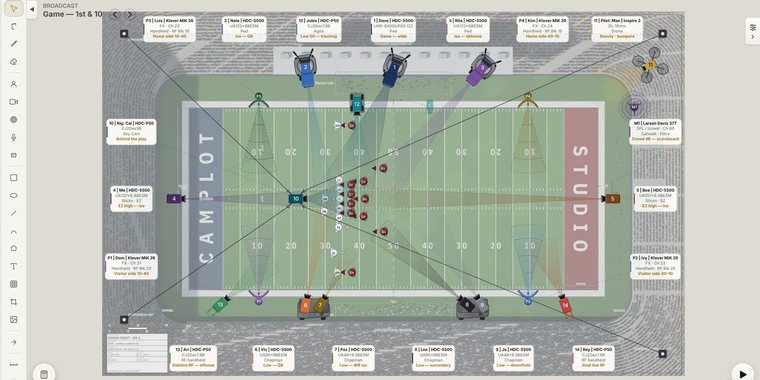
The camera plot app for scripted, unscripted, live and broadcast — the desert road, the competition stage, the festival main stage, the football field. Every coverage cone is the angle that body and that glass actually see.

  • Lens-accurate coverage from the real sensor window — 50+ bodies, 150+ scan modes
  • Cameras, lights and mics — fourteen rigs from sticks to cable cam, fixtures with their real throw, mics with their pickup
  • Ground plans four ways — import a PDF, LiDAR-scan the room, pull it off satellite, or draw it
  • Movement you can play back — paths, jib arms and dolly track on one shared count
  • Live crew sharing and a camera report that writes itself, each camera in its plot colour
Web · iPhone · iPad · Mac
Included with CamPlot Max
CamPlot Director’s Viewfinder app icon
CamPlot
Viewfinder
Every camera. Every lens.
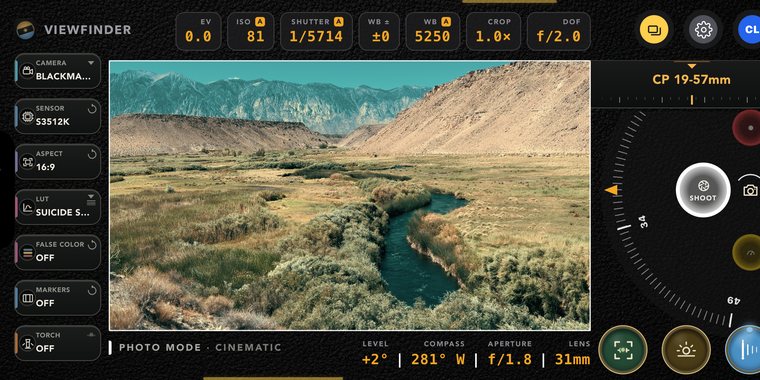
The Director's Viewfinder framing a wide valley through a Blackmagic body, with live exposure readouts along the top and the lens roll on the right

A real cinema camera in your hand on the scout. Pick the body, roll to any focal length, and look at the shot through the glass you will actually be shooting on.

  • 40+ cinema bodies with their published scan windows, and your own lens kit on a roll
  • 230+ true 3D LUTs, plus your own .cube files — exportable for any camera’s log
  • Five working modes — photo, video, exposure meter, LiDAR scanner, monitor calibrator
  • Today’s sun and moon paths drawn across the frame, so you know when the light arrives
  • Scout frames save straight onto the camera on your plot
iPhone · iPad · Also in the browser
Free to try · Full with CamPlot Plus
CamPlot Calculators app icon
CamPlot
Calculators
Free in your browser
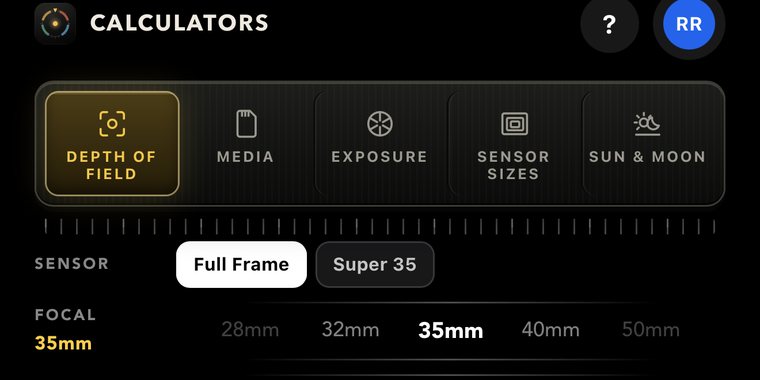
The CamPlot Calculators with the five tools across the top — depth of field, media, exposure, sensor sizes and sun and moon — and the depth of field parameters below

The five numbers a camera department runs on — as dials you turn, with the answer moving while you turn them, rather than rows with a Calculate button.

  • Depth of field you can see fall off in a real photograph, not just read
  • Media — hours on the actual card, across 57 cameras and 246 recording formats
  • Exposure — lock three dials, roll the fourth, ND included
  • Sensor sizes — any three bodies drawn to scale against each other
  • Sun & Moon — where they will be, at the location, on the day
In your browser, no sign-up · iPhone app
All five tools free
One account

Buy it once. It works in all three.

There is one subscription across CamPlot Studio, not three. Each level lights up more of the same three apps — and the bottom level, the one your whole crew is on, costs nothing and never expires.

Creator
Viewfinder
Calculators
CamPlot Crew — Free
$0 forever · no card
View shared plots, live Preview mode All five tools
CamPlot Plus
$29.99/yr · $3.99/mo
View, mark up, export PDF Every camera, lens & LUT All five tools
CamPlot Max
$49.99/yr · free trial
Build & share your own plots Every camera, lens & LUT All five tools
Only the person building the plots needs to pay · Everyone they share with is free
“I spent years plotting cameras in Keynote — forcing a presentation tool to do something it was never built for. CamPlot does in minutes what used to take me hours.”
Designed by a multi Emmy Award-winning DGA multicam director
Pricing

One plan for the director. A free seat for the crew.

Identical on the web, the App Store and the Mac — there is no platform markup. Cancel from your account at any time.

CamPlot Crew — Free
$0 forever
No card, no trial clock
  • Open every plot shared with you, live as it changes
  • Camera and inventory reports
  • Push notifications when a setup moves
  • All five Calculators, free
  • The Viewfinder in preview mode
For the whole crew
CamPlot Plus
$29.99/year
or $3.99/month
  • Everything in CamPlot Crew — Free
  • The full Director’s Viewfinder — every camera, lens and LUT
  • 230+ cinema LUTs, exportable for your camera
  • Private markup and notes on plots shared with you
  • PDF export of plots and camera reports
For the crew who scout
CamPlot Max
$49.99/year
or $4.99/month · free trial included
  • Everything in CamPlot Plus
  • Build and share your own plots, unlimited projects and setups
  • Lens-accurate coverage, movement, jib and dolly
  • Ground plans: import, LiDAR scan, satellite and draw
  • Live crew sharing, collaborators and camera reports
  • Cloud save with 10-day rolling backups
The full CamPlot Studio
CamPlot Enterprise
CamPlot Max for the whole team, sold per seat, billed yearly by card or invoice.
  • One portal to add and remove people — every seat is the full CamPlot Max
  • Download or share any member’s project; a shared library of logos and objects
  • Managers with the permissions you choose, and an activity log of every change
  • Capacity monitored around the clock and scaled ahead of demand, so the team never waits
  • A dedicated support line that reaches a person: enterprise@camplot.studio
Create an enterprise account Talk to us first
Sign the order form online — nothing is charged until we approve it
Questions

The things people ask first

What is CamPlot Studio?
It is the studio behind three apps for directors and the camera department: CamPlot Creator, the overhead multicam plot tool; the CamPlot Director’s Viewfinder; and CamPlot Calculators. They are separate apps because they are used at separate moments — prep, scout, and set — but they share one account, one visual language, and one subscription.
What happens when I sign in with Google?
Signing in with Google, Apple or an email and password creates your CamPlot Studio account — the one account that opens CamPlot Creator, the Viewfinder and the Calculators on the web, iPhone, iPad and Mac, and keeps your plots, your lens kit and your subscription with you on every device. From Google we receive only your name, email address and profile picture. We never see your password, never ask for your Gmail, Drive or anything else in your Google Account, and never sell or advertise with what we receive. The Privacy Policy spells out how it is stored and how to delete it.
Do I need three accounts, or three subscriptions?
One of each. Sign in once and every app you are entitled to opens; buy CamPlot Max or CamPlot Plus anywhere — the web, either iOS app — and it applies everywhere immediately. You are never asked to buy the same thing twice.
Does my crew have to pay?
No. Anyone you share a plot with views it free, forever, on CamPlot Crew — including live updates as you change it, the camera and inventory reports, push notifications when something moves, and all five Calculators. Only the person creating plots needs CamPlot Max. Crew who want private markup, PDF export, or the full Viewfinder in their own pocket can add CamPlot Plus for themselves, but nobody has to.
Are the Calculators really free?
Yes — all five tools, every control, at every account level, CamPlot Crew included. There is no upgrade to reach for inside them. Make an account and they are yours; if you are signed out they run in a locked demo, so the only thing the gate protects is the sign-up.
What is the difference between CamPlot Plus and CamPlot Max?
CamPlot Max is for the person building the plots — creating, editing and sharing them, with everything CamPlot Creator can do. CamPlot Plus is the crew upgrade: it keeps free viewing and adds the full Director’s Viewfinder, private markup and notes on plots shared with you, and PDF export. Every CamPlot Max plan already includes CamPlot Plus.
Which devices do these run on?
CamPlot Creator runs in any browser and as a real app on Mac, iPhone and iPad, Android, Chrome and Edge — and installs to the home screen on all of them. The Viewfinder and the Calculators are iPhone and iPad apps that also run inside CamPlot Creator in the browser. It is the same project everywhere, on the same account.
Does it work without internet?
Yes. Install it and it opens and works offline — in the truck, in the arena, on a stage with no bars. Your changes sync the moment you are back, and merge with anything that changed while you were gone.
How do payments work?
On the web, billing is handled securely by Stripe; in the iOS apps it goes through your Apple ID. Prices are identical either way — there is no platform markup. You can switch between monthly and annual, or cancel, from your account, with no emails and no phone calls.
CamPlot Studio

Plot the day. See the shot.
Run the numbers.

Start with the plot tool in your browser — there is nothing to install, and your crew never pays.

No install neededOpen CamPlot Creator in your browser See the three apps ↑
Free trial · Cancel anytime