CamPlot Recorder app icon
CamPlotRecorder
Coming soon · for iPhone & iPad

Four mics. Four tracks.
Nothing stops it.

The recorder for the DJI Mic 3 in Quadraphonic mode: every transmitter on its own track, on your iPhone or iPad. Hit Record, lock the phone, put it in your pocket.

Coming soon to the App Store See the app ↓
Free download · included with CamPlot Plus and Max · iPhone & iPad with USB-C
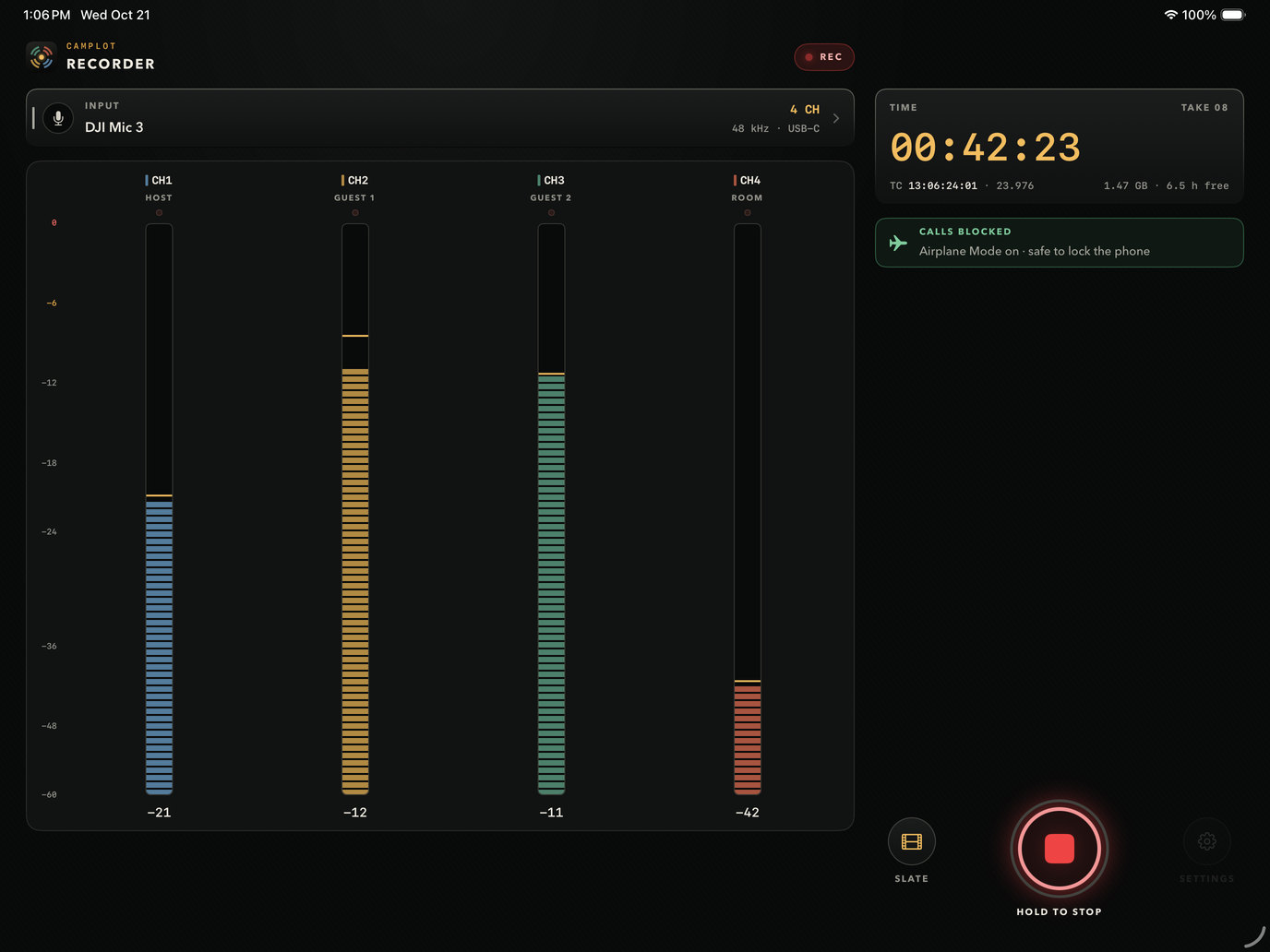
CamPlot Recorder on iPad recording four DJI Mic 3 transmitters, Host, Guest 1, Guest 2 and Room, each on its own tall meter, 42 minutes into the take with calls blocked
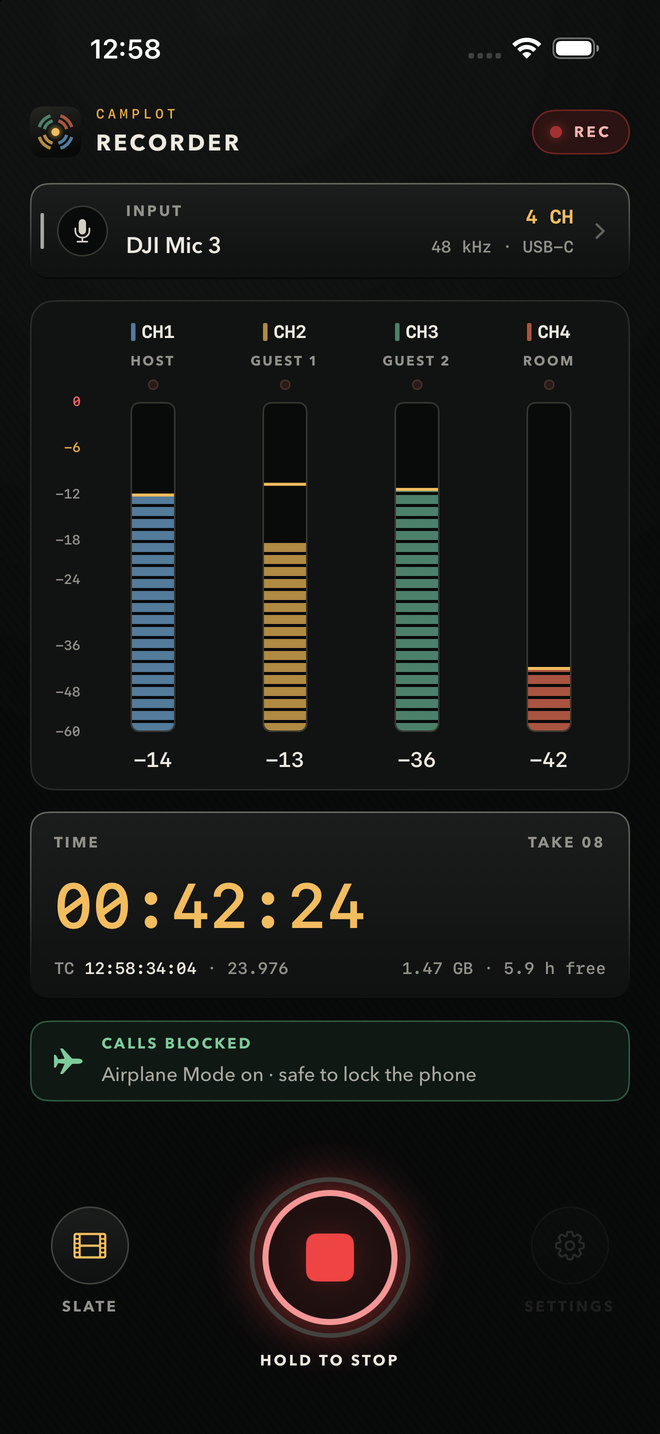
CamPlot Recorder on iPhone recording four tracks from a DJI Mic 3 at 42 minutes, with timecode and Airplane Mode on
A take 42 minutes in, on iPad and iPhone · four transmitters, four tracks · real screens, to scale
4
Separate tracks
32-bit
Float, or 24-bit
BWF
Timecode + mic names
0
Taps once it rolls
Works with

Made for the DJI Mic 3. Ready for more.

Anything that sends separate channels over USB-C gets its own meter and its own track. The number is how many tracks reach the iPhone or iPad.

4 tracks · wireless

4
DJI Mic 3Quadraphonic mode, four transmitters
TESTED
4
Hollyland Lark M3Four isolated tracks over USB-C
BETA
4
Sony ECM-W5Up to four channels · out in November
BETA

More tracks · recorders & interfaces

6
Zoom H6essential32-bit float · USB audio interface mode
BETA
12
Zoom H8USB audio interface mode
BETA
4
Zoom M4Handheld, four inputs over USB
BETA
8
Tascam Portacapture X8 · X6USB audio interface mode
BETA
6
MOTU M6 · M4Class-compliant · the M4 sends 4
BETA

2 tracks · records both

2
RØDE Wireless PRO · GOSplit mode, one mic per track
2
Sennheiser Profile WirelessStereo mode, one mic per track
2
DJI Mic 2 · DJI Mic MiniTwo transmitters
2
Hollyland Lark Max 2 · M2STwo tracks over USB-C
2
Shure MoveMic · SaramonicWith their USB-C receivers
1
The built-in microphoneWhen nothing is plugged in

DJI, Hollyland, Sony, Zoom, Tascam, MOTU, RØDE, Sennheiser, Shure and Saramonic are their owners' trademarks. CamPlot is not affiliated with or endorsed by them.

Inside the app

How a take works

Plug in, check, slate, roll. These are the real screens.

1 · Before you roll

Ready before you roll

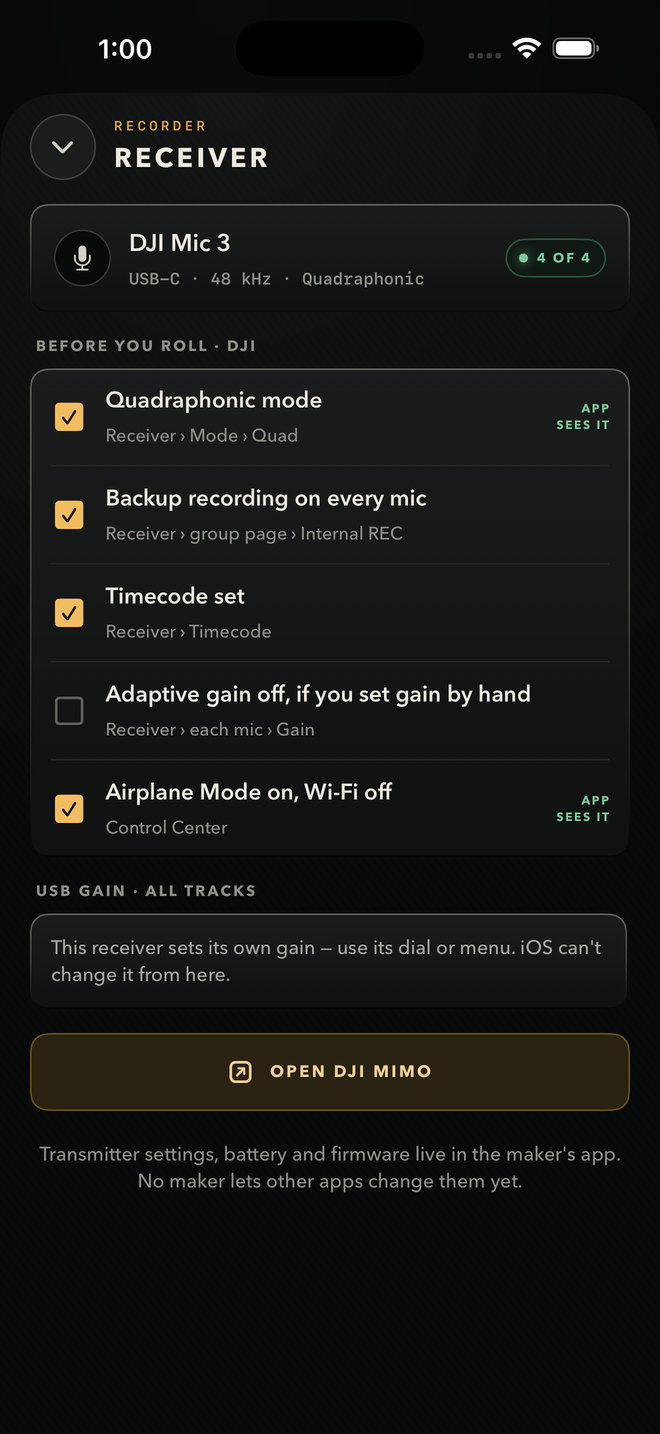
Tap the input and the Receiver screen shows what's plugged in, how many channels reach the phone, and a checklist for that brand.

  • DJI Mic 3: Quadraphonic mode, backup recording on every mic, timecode.
  • Airplane Mode with Wi-Fi off, so no call can take the mic mid-take.
  • Open DJI Mimo in one tap for the mics' own settings.
CamPlot Recorder's Receiver screen: a DJI Mic 3 sending 4 of 4 channels and a before-you-roll checklist for Quadraphonic mode, backup recording, timecode, gain and Airplane Mode
Receiver · 4 of 4 channels
2 · Slate

A slate on every take

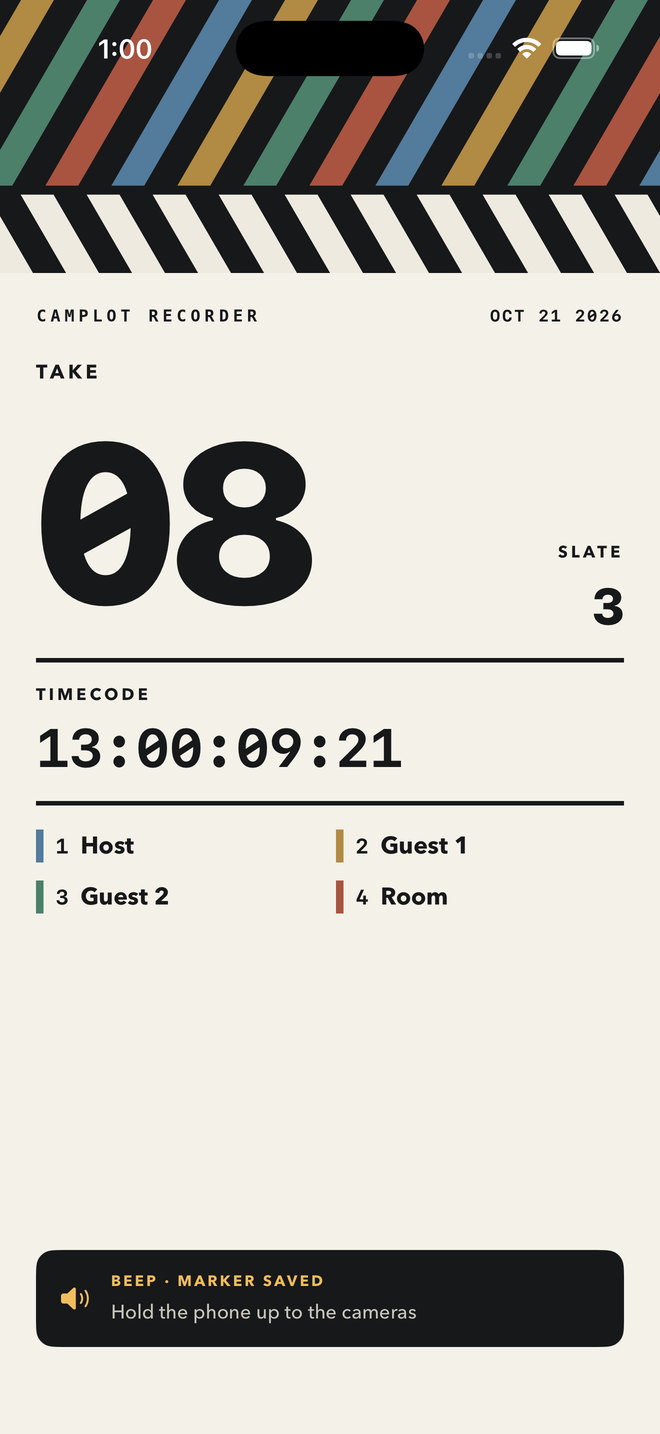
Tap Slate and the phone beeps, fills the screen with a card to hold up to the cameras, and drops a marker in the file at that exact moment.

  • The take, slate number, timecode and every mic's name on the card.
  • Turn on Slate when I hit Record and every take starts with one.
CamPlot Recorder's slate card: take 08, slate 3, timecode 13:00:09:21 and the four mic names, with a beep and a marker saved in the file
Slate card · marker saved
3 · Takes

Every take saved as you go

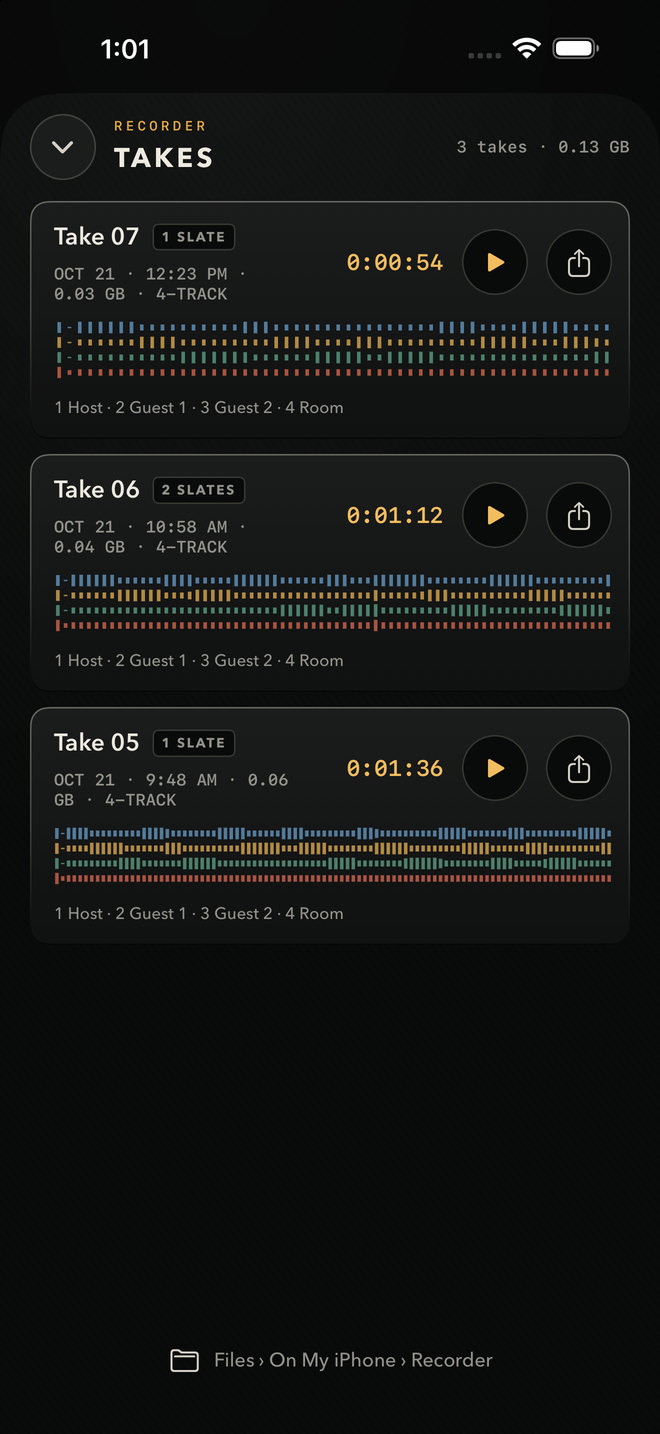
Each take shows its slates, its size and a waveform for every mic. The file is saved every two seconds while it records.

  • Share by AirDrop, Mail or Files.
  • Every WAV is in the Files app under On My iPhone › Recorder.
CamPlot Recorder's Takes list: three takes with their slates, size, four-track waveforms, play and share buttons
Takes
4 · Playback

Solo any voice

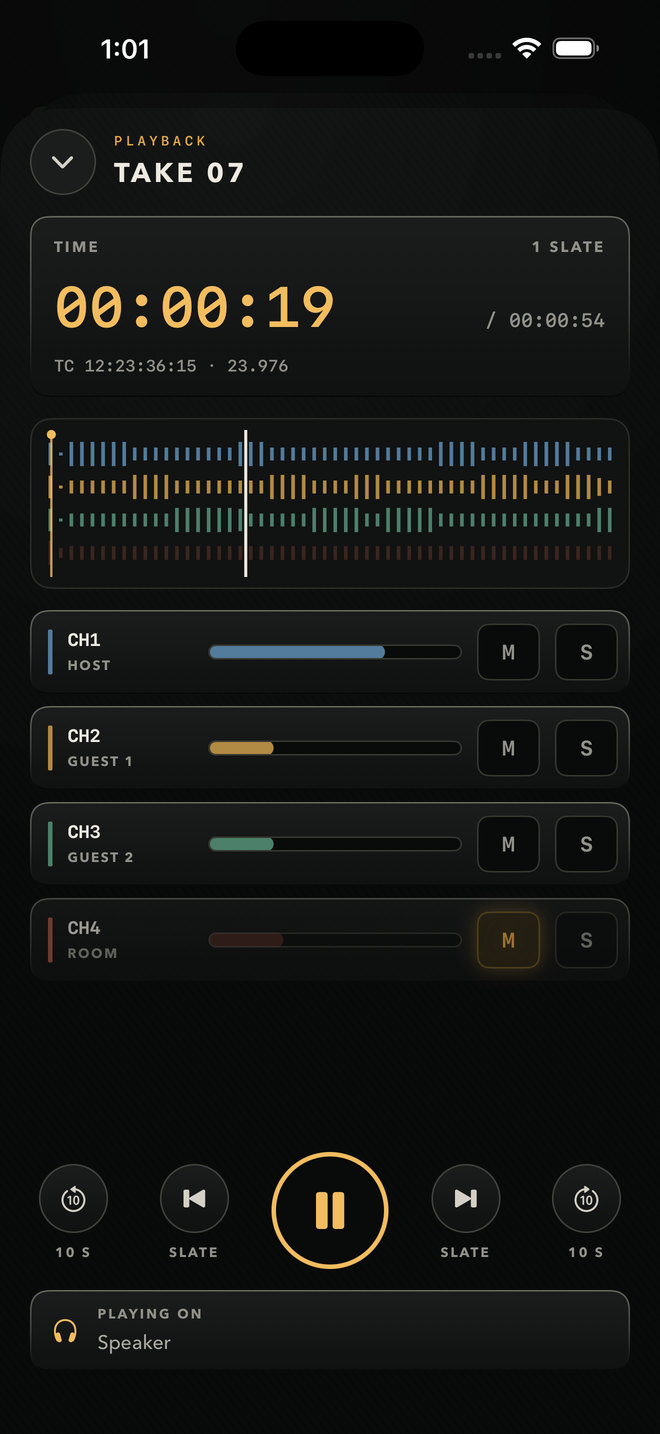
Play a take back with every mic on its own lane. Mute or solo each one, scrub, and jump slate to slate.

  • Plays on the phone's speaker with the receiver still plugged in.
  • Timecode and slates shown as it plays.
CamPlot Recorder playing take 07: a lane per mic, mute and solo on each, slate jumps and playback on the phone's speaker
Playback · take 07
5 · Settings

Timecode and names in every file

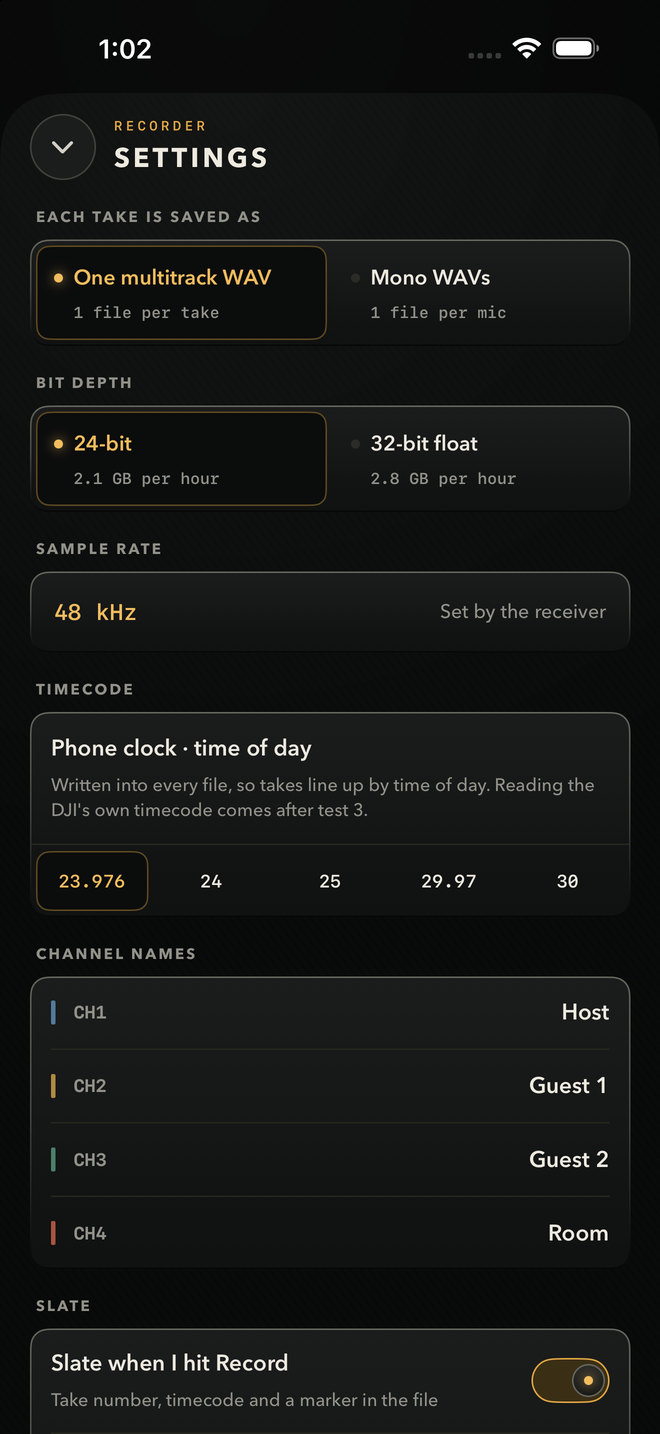
Choose how each take is saved. Whatever you pick, the file carries the timecode, the take and every mic's name into the edit.

  • One multitrack WAV per take, or a mono WAV per mic.
  • 24-bit or 32-bit float, at the receiver's sample rate.
  • Time-of-day timecode at 23.976, 24, 25, 29.97 or 30 fps.
CamPlot Recorder settings: one multitrack WAV or mono WAVs, 24-bit or 32-bit float, the receiver's sample rate, time-of-day timecode at 23.976 to 30 fps, and channel names
Settings
On iPad

The same recorder on iPad

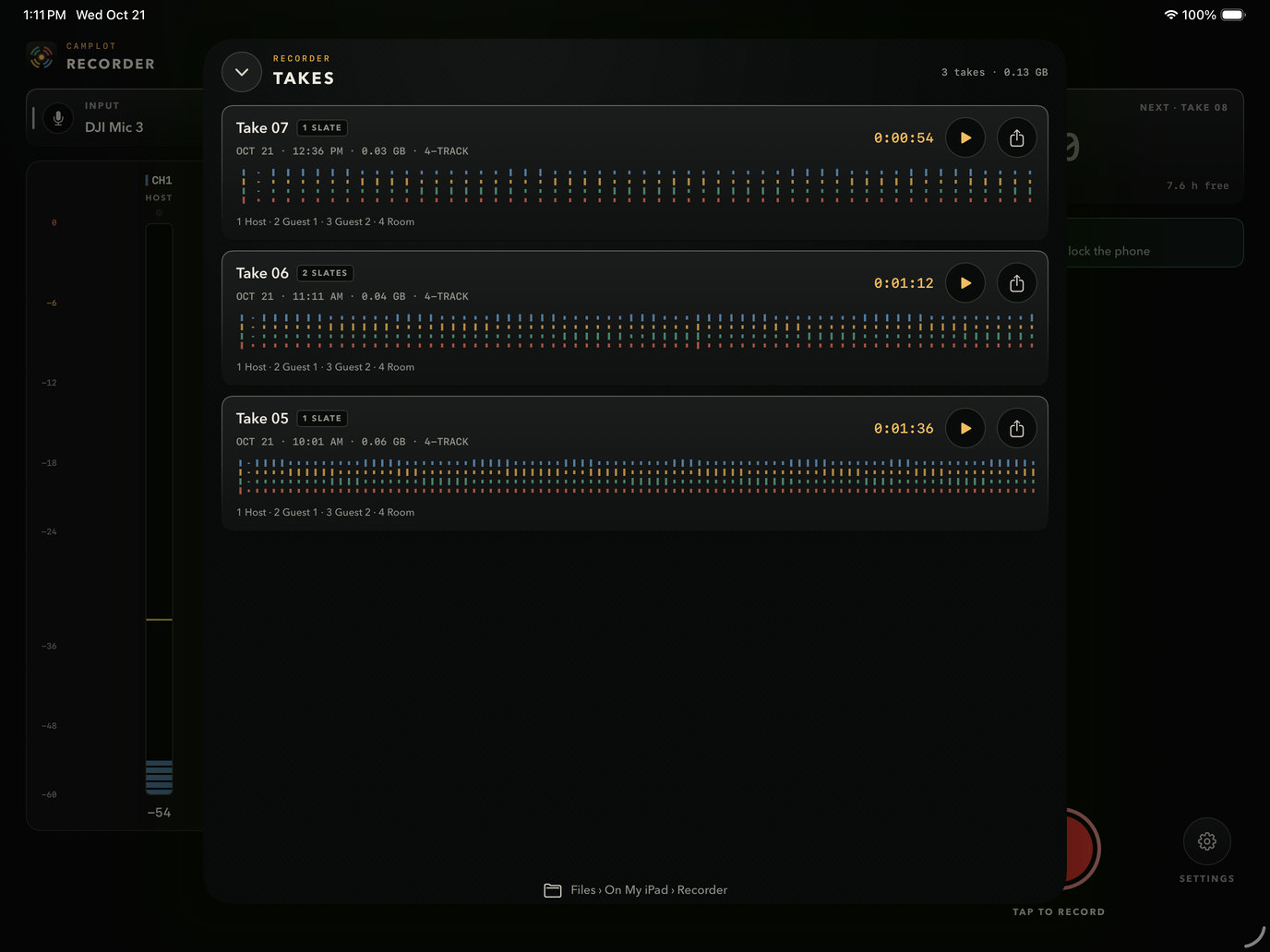
Tall meters on one side, the time and the record button on the other. Takes slide up over the top.

CamPlot Recorder on iPad with the Takes list open over the recorder: three takes with four-track waveforms, play and share buttons
iPad Pro 13" · Takes
On set

Built for the take you can't do again

Unscripted, interviews, documentary, a podcast in a car: the phone records every mic on its own, and nothing short of a dead battery stops it.

Every mic, its own track

One multitrack WAV per take, or a mono WAV for each mic. Fix one person's levels in the edit without touching anyone else.

Locked, in a pocket

Hit Record, lock the screen, put the phone away. Stopping takes a deliberate hold, so a stray tap can't end a take.

Safe if anything goes wrong

The file is saved every two seconds. If the battery dies or the app is closed, the take is there the next time you open it.

Calls can't sneak in

It shows whether a call could ring through before you roll. If one does, the take so far is saved, the phone buzzes, and it carries on as the next part.

A slate that syncs

A sharp beep the cameras hear, a flash card to hold up, and a marker in the file at that exact moment.

Timecode and names in the file

Broadcast WAV with time-of-day timecode, the take number and every mic's name, so the edit lines takes up and labels the tracks.

Tap a meter to name it

Host, Guest, Room: tap a meter and type. It works mid-take, and the name goes into the file being recorded.

Play it back, one voice at a time

Every track as a lane you can scrub, with mute and solo on each mic and a jump from slate to slate.

Off the set in seconds

Share a take by AirDrop, Mail or Files, or find every WAV in the Files app under Recorder.

How it works

Three steps to four tracks

1

Set the receiver to Quadraphonic

On the DJI Mic 3 receiver, choose the four-channel mode. Turn on each transmitter's own backup recording while you're there.

2

Plug it into the iPhone or iPad

USB-C, straight in. Four meters appear, one for each transmitter. Tap each meter to name the person wearing it.

3

Record, slate, lock

Turn on Airplane Mode, hit Record, hold the slate up to the cameras, lock the phone. Hold the button to stop.

Questions

Good to know

How do I record all four DJI Mic 3 transmitters as separate tracks on an iPhone?

Set the DJI Mic 3 receiver to Quadraphonic mode, plug it into the iPhone's USB-C port and open CamPlot Recorder. It asks iOS for every channel the receiver sends, shows a meter for each transmitter, and records each one as its own track: one four-track WAV, or four mono WAVs if you prefer.

Does it keep recording with the screen off or the phone in my pocket?

Yes. Once you hit Record it keeps going with the screen locked and the phone in a pocket. Stopping takes a deliberate hold, and the file is saved every two seconds, so even a dead battery doesn't lose the take.

What happens if someone calls during a take?

iOS lets a ringing call take the microphone from any app, so CamPlot Recorder tells you before you roll whether a call could get through, and shows you how to switch on Airplane Mode with Wi-Fi off. The receiver keeps working because it's plugged in. If a call does get through, everything so far is saved, the phone buzzes, and the take carries on as the next part.

What files does it make?

Broadcast WAV at the receiver's sample rate (48 kHz on the DJI Mic 3), 24-bit or 32-bit float. Every file carries time-of-day timecode, the take number, each mic's name and a marker at every slate.

Does it record timecode?

Every file is stamped with time-of-day timecode from the phone's clock, at the frame rate you choose. Reading the DJI Mic 3's own timecode is being tested; the transmitters' backup recordings carry the DJI's timecode either way.

Does it work on iPad?

Yes, on any iPad with a USB-C port. The iPad gets its own layout, with tall meters on one side and the time and the record button on the other.

Can it change the DJI Mic 3's settings or start the transmitters' own recording?

Not yet. DJI only lets its own DJI Mimo app and the receiver's screen change the Mic 3's settings. CamPlot Recorder shows a checklist of what to set on the receiver (Quadraphonic mode, backup recording on every transmitter, timecode) and a button to open DJI Mimo. Other brands work the same way.

Which other mics and recorders work?

Anything that sends separate channels over USB-C: the Hollyland Lark M3, Zoom H6essential, H8 and M4, Tascam Portacapture X8 and X6 and MOTU interfaces in USB audio mode. Two-channel systems like the RØDE Wireless PRO, Sennheiser Profile and DJI Mic 2 record both tracks.

Does it work with the Hollyland Lark M3 or other 4-channel receivers?

CamPlot Recorder records every channel a USB-C device sends, each as its own track, so a receiver or recorder that sends four separate channels to a phone gets four tracks. It is tested with the DJI Mic 3 in Quadraphonic mode; the Hollyland Lark M3, the Sony ECM-W5 and recorders like the Zoom H6essential are supported in beta.

How is it different from recording audio in a camera app?

Camera apps record sound alongside a video file. CamPlot Recorder is audio only: no video eating the storage, every mic on its own named track, a slate marker you can sync to in the edit, timecode in every file, and it keeps recording with the screen locked and the phone in a pocket.

Does it work on Android or on a Mac?

No. CamPlot Recorder is for iPhone and iPad with a USB-C port. CamPlot's other apps run on the web, Mac and Android.

How do I get it, and what does it cost?

It's coming soon to the App Store as a free download for iPhone and iPad. Recording is included with CamPlot Plus and CamPlot Max: start a free trial in the app, or sign in with the CamPlot account you already use for CamPlot Creator, the Viewfinder or the Calculators. See the plans on camplot.studio.
Get it

Coming soon to the App Store. Included with CamPlot Plus and CamPlot Max.

A free download for iPhone and iPad with USB-C. Start a free trial in the app, or sign in with the account you already use in Creator, Viewfinder and Calculators.

CamPlot PlusCamPlot Max
Coming soon to the App Store See the plans →
CamPlot Recorder

Every mic on its own track.
The phone in your pocket.

Built by a working director, for the takes that only happen once.

Coming soon to the App Store See all the apps →